Scribe & Telehealth · Clinical documentation
Your consultation is the note. In the room or on video.
Scribe listens while you talk, drafts the note in the format your specialty uses, and files it onto the chart as coded FHIR. Video visits run on the same screen and the same record, so a remote consult leaves behind exactly what a room consult does.
In person or on video · 50 languages, 72 regional variants · nothing files until you sign
The documentation bill
You are already paying for a scribe, a video link, and the copy-paste between them.
A standalone scribe writes you a good note in someone else's app. A separate video tool gives you a room with no chart in it. What joins them is a clinician at the end of the day, pasting text into the record and re-keying the orders that were already decided out loud. Scribe and telehealth are part of IASORA, on the same patient record as the rest of the clinic, so there is nothing to move between them.
While you consult
Talk to the patient. Watch the transcript, not the keyboard.
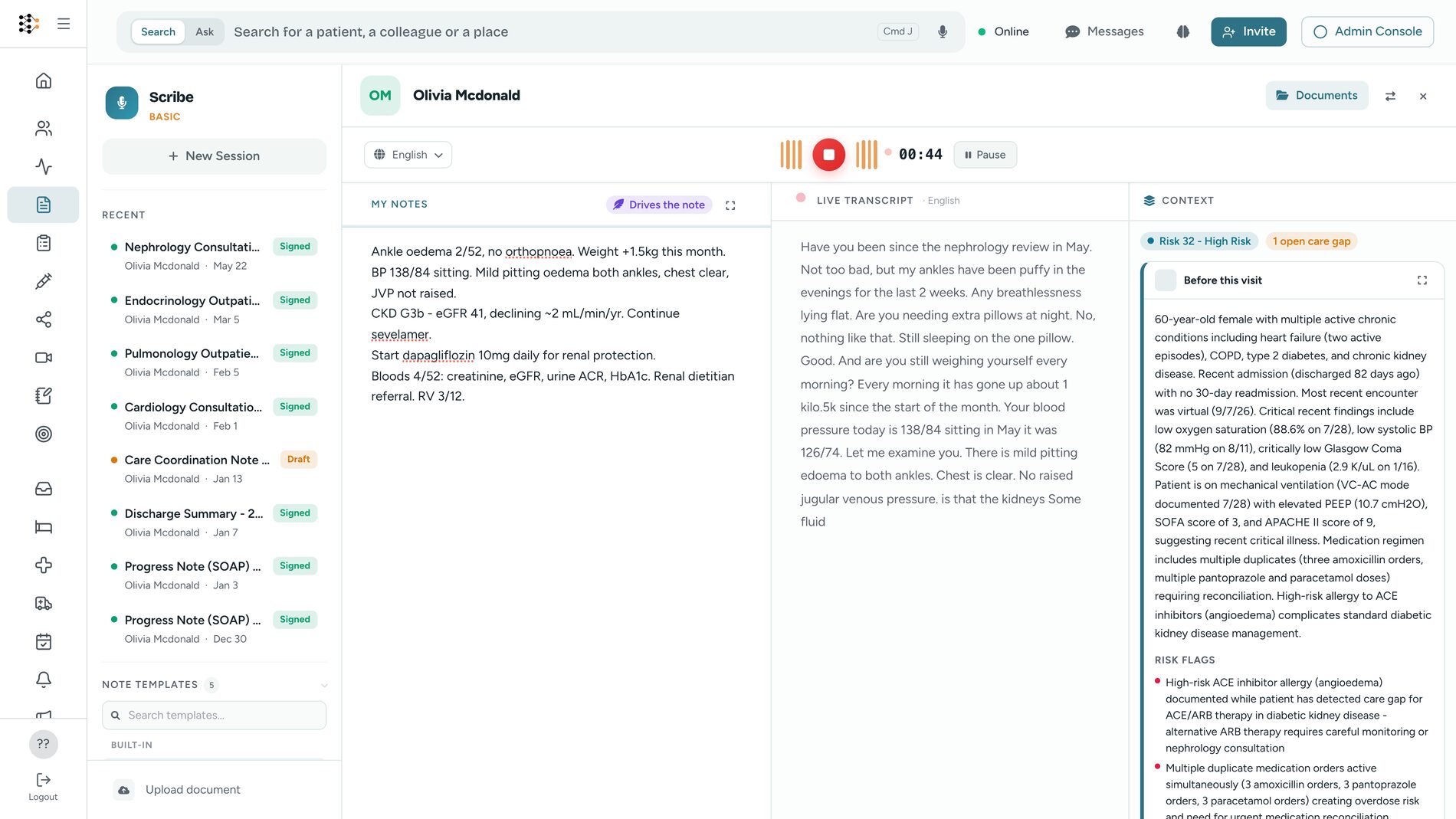
Open Scribe, press record, and have the consultation you were going to have anyway. The transcript builds live on screen beside the patient's chart, and what you jot as you go becomes the spine of the note.
Ambient recording
One button. No per-patient setup, no dictation voice, no keywords to remember. Pause it and pick it up when the consultation resumes.
Live transcript
Words appear as they are spoken, not after the visit, so you can see what was captured while you can still repeat the sentence that was missed.
My Notes drives the note
Jot your decisions in the scratchpad as you go. Those words are authoritative: they steer what gets written, and the signed document keeps your original text alongside the draft.
The chart, beside you
Problems, medications, allergies, recent vitals, risk and open care gaps sit in the rail next to the transcript. No second tab, no hunting for last month's result.
50 languages, 72 variants
Consult in the patient's language and get the note in yours. Twelve Indian languages, Arabic, Tagalog, Swahili and English in nine accents, picked per session.
On the phone in your pocket
The same scribe runs in the IASORA mobile app: same languages, same templates, same scratchpad. Record a ward round from the bedside.
The note
The format your specialty writes in, not the one your scribe prefers.
Five note types ship as standard: SOAP, progress note, consultation note, discharge summary and GP letter. Beyond those, your workspace's own specialty templates are built in the form designer and appear in the picker, so a cardiology clinic and a psychiatry clinic write the notes they actually write.
Pick the format
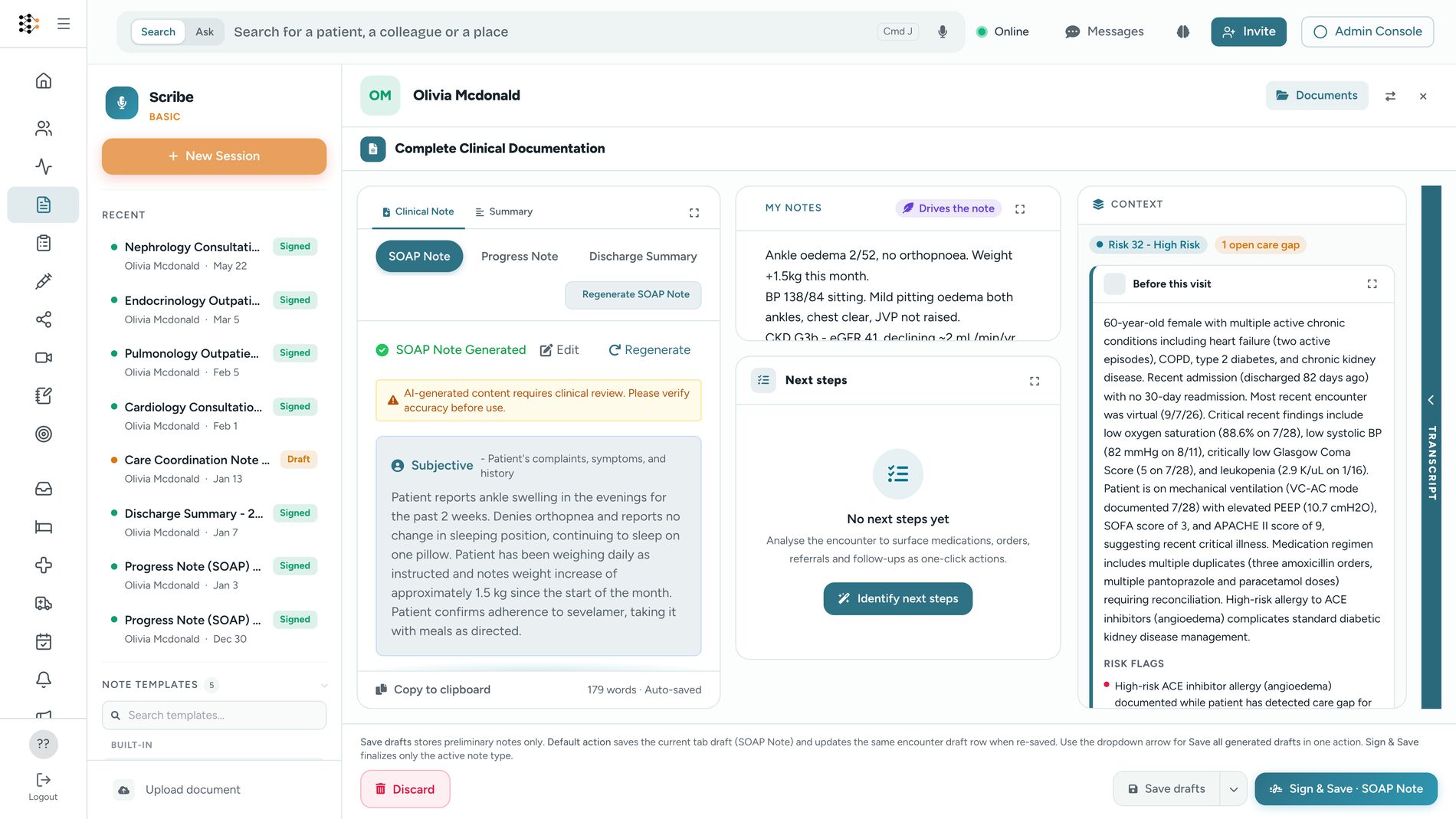
Choose a note type or one of your workspace's specialty templates before or after the visit. Generate again in a different format if the first is not the one you wanted.
Read it against the transcript
The draft, your scratchpad, the next steps, the extracted concepts and the full transcript are all on one screen. Hover a line in the note to see where in the conversation it came from.
Edit anything
Every section is editable text. Correct it, cut it, write it yourself. You can also skip generation entirely and write the note by hand in the same editor.
Sign, or discard
Sign and it files to the chart. Save a draft, or send one for a senior to co-sign. Discard and nothing whatsoever is written to the record.
What reaches the chart
Coded data on the record, not a text blob in an app.
This is the difference between a scribe and a documented visit. A signed note becomes a FHIR document on the patient's chart, and the clinical facts inside it can be put onto the problem list, the medication list and the allergy list as coded entries the rest of the platform can act on.
ICD-10, SNOMED, RxNorm, LOINC
Conditions, medications, allergies and results are pulled out of the conversation and coded, with CPT for the procedural side. Suggestions, until you accept them.
One concept at a time
Nothing lands on the problem list because a model heard it. Each extracted concept is confirmed individually, and anything the patient denied is blocked from being confirmed at all.
It argues with the chart
If the visit says the patient stopped warfarin and warfarin is still active, or says no diabetes while diabetes is on the problem list, Scribe puts the contradiction in front of you instead of filing over it.
Orders, drafted not sent
The labs, imaging, prescriptions and referrals you decided out loud come back as draft orders, ready for the order screen. Only what you said you would order, never what a model inferred.
Traceable back to the visit
Every concept written to the chart records where it came from, so a year later you can see which consultation put it there and read the note it came from.
One note, once
A session can only be signed once, whatever happens to the network or the double-click. Two clinicians cannot produce two signed notes from the same consultation.
Telehealth
A video visit that leaves the same record behind as a room visit.
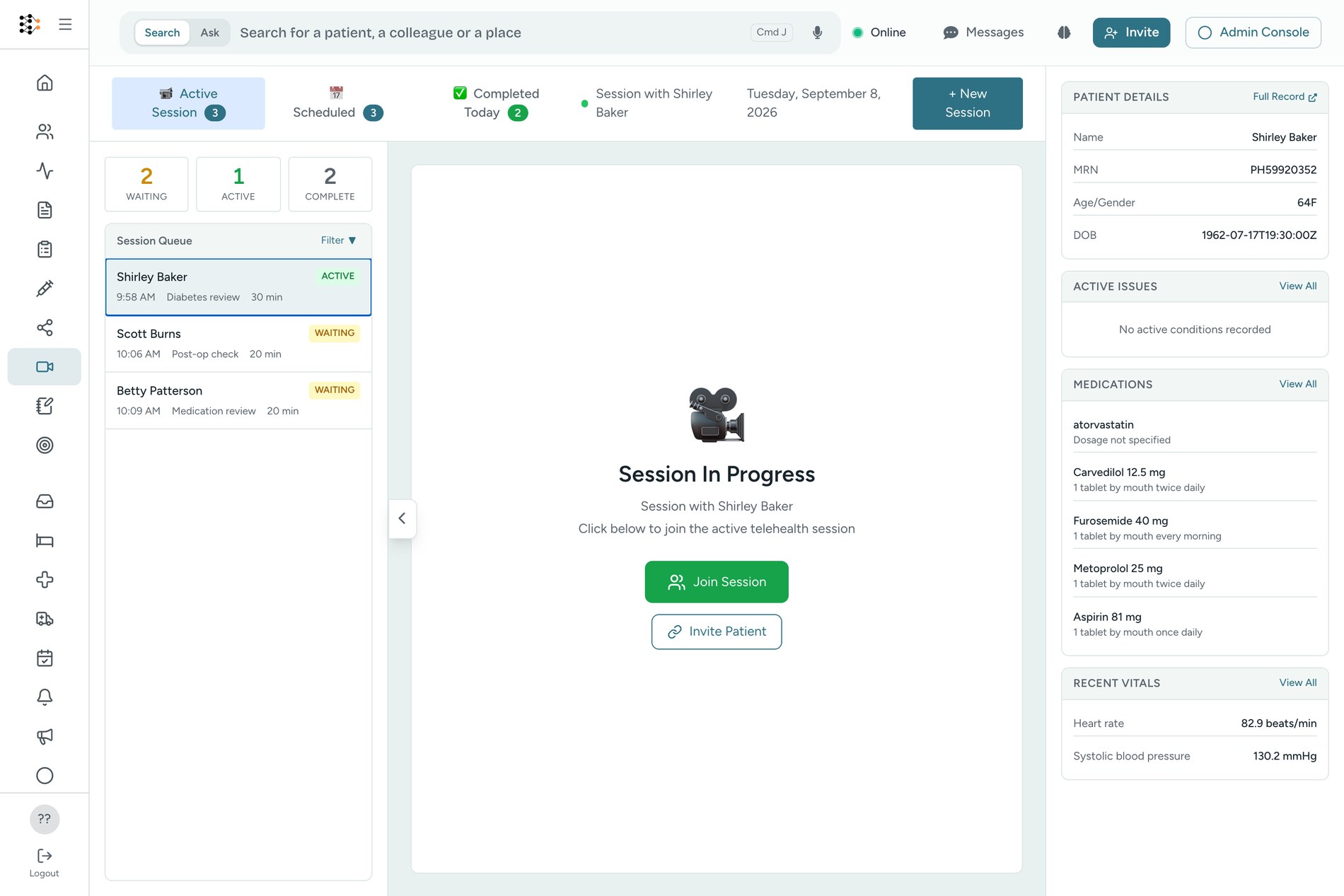
Launch the call from the appointment on today's list. The patient taps a link and is in, on whatever device they have: no app to install, no account to create, no password. Beside the video sits the same panel you use in the room, carrying the live transcript, your notes and the patient's record a tab away.
Video, screen share, chat
Camera, microphone and speaker selection, background blur, in-call chat with file sharing, screen share and a snapshot button, on our own media servers rather than a third party's.
The patient just taps a link
Sent as a text message or an app link. No download, no sign-in, no forgotten password at the start of the consultation.
Bring in a colleague
Invite a specialist or a regional colleague into the same room as an additional provider. Up to ten people on a call, so a family member can be there too.
Scribe is already in the room
Turn transcription on and the call feeds Scribe as it happens, both sides of the conversation. End with Complete & Document and the note editor opens with the transcript already in it.
Recording needs the patient's yes
A recording cannot start on the clinician's word alone. The patient is asked in the call and has to agree, and the recording then files to their chart as a document like any other.
It is an appointment, not a link
The session is the appointment and the encounter, so it appears on the schedule, on the chart and in your reporting the same way an in-person visit does.
Clinicians spend 2 hours on notes for every 1 hour with patients, on the Annals of Internal Medicine time-and-motion numbers. Scribe gives that time back.
Where it earns its keep
Four ordinary days in a clinic.
The clinic consultation
Phone on the desk, record, talk to the patient. The note is drafted by the time they stand up, and the follow-up bloods are already sitting as a draft order.
The remote follow-up
A post-op check that did not need a car park. Launch the call from the schedule, examine what can be examined, and finish with a signed note on the same chart.
The ward round
Record at the bedside on the mobile app and write progress notes for the round without carrying a laptop between beds.
The consultation letter
The GP letter is a note format, not a second piece of work. Generate it from the same visit that produced the consultation note.
The note is not the end of the workflow. It is the start of one.
A standalone scribe hands you text. Because Scribe writes coded FHIR onto the same record as the rest of IASORA, the visit keeps working after you sign it: a new diagnosis moves the patient's risk score, a missed care gap closes, the follow-up you dictated becomes a task, and the recall reaches the patient on WhatsApp. That is what an integrated scribe buys you and a point solution cannot.
Connect
The follow-ups and recalls the visit created, sent on the channel the patient already uses.
Explore Connect →Patient 360
Every signed note, coded concept and video visit on one timeline with the rest of the record.
Explore Patient 360 →Automation & Insights
Agents act on the finished note: coding review, referral chasing, follow-up scheduling.
Explore Automation →Pricing
Priced per clinic, not per clinician.
There is no separate scribe subscription and no separate telehealth subscription. Both come with the rest of the clinic on one plan, and what changes between plans is how much you use. Prices are US list in USD, shown in local currency at checkout, taxes extra.
Add every clinician and your whole front desk on any plan, including Free. Clinics in India, South East Asia and Latin America pay $49 and $149 for the same plans and the same allowances.
Get started
Talk to your next patient. Not to your keyboard.
Scribe one consultation on the free plan and read what lands on the chart. No card, no per-clinician seat.